Putting Copilot Agents into Production in Dynamics 365: Security Roles, Data Boundaries, and the Day-2 Work Nobody Demos
The demo always goes the same way. Someone types "create a purchase requisition for 200 units of the steel bracket from our usual vendor and route it for approval" into a chat pane, and the AI agent finds the item, picks the vendor, fills the form, and submits the workflow. But three weeks later, that agent is in production, and the questions start: Why can this thing see payroll? Who approved it, touching the ledger? It just edited a record nobody asked it to; was that allowed?
I've now deployed enough Copilot agents for Dynamics 365 Finance & Operations to say the quiet part out loud. Building the agent is only 20% of the journey. The remaining 80%, which entails deploying, governing, monitoring, and running it safely at scale, is where the real complexity begins. This article is about the 80%.
The Demo Problem
Demos optimize for the happy path. A scripted prompt, clean data, one user, no edge cases, and a presenter who knows exactly what the agent will do because they rehearsed it. Production is the opposite of all of that. You get prompts nobody anticipated, users with wildly different permissions, dirty data, and an agent that's now allowed to act, not just answer.
The business challenge isn't "can the agent do the task?" It demonstrably can. The challenge is ownership: who is accountable for what the agent is permitted to see and do, who watches it, who gets paged when it misbehaves, and who can prove to an auditor that it stayed inside its lane. That's an operations discipline, and it's one most teams haven't built yet because the technology only made autonomous action practical very recently.
What Actually Changed
If you wired an agent to F&O over the last year, you probably used the static Dynamics 365 ERP MCP server, a fixed set of 13 tools built on the Dataverse connector framework. It worked, but it was rigid, and Microsoft is retiring it during the 2026 calendar year. The replacement, the “dynamic” Dynamics 365 ERP MCP server, went generally available in February 2026.
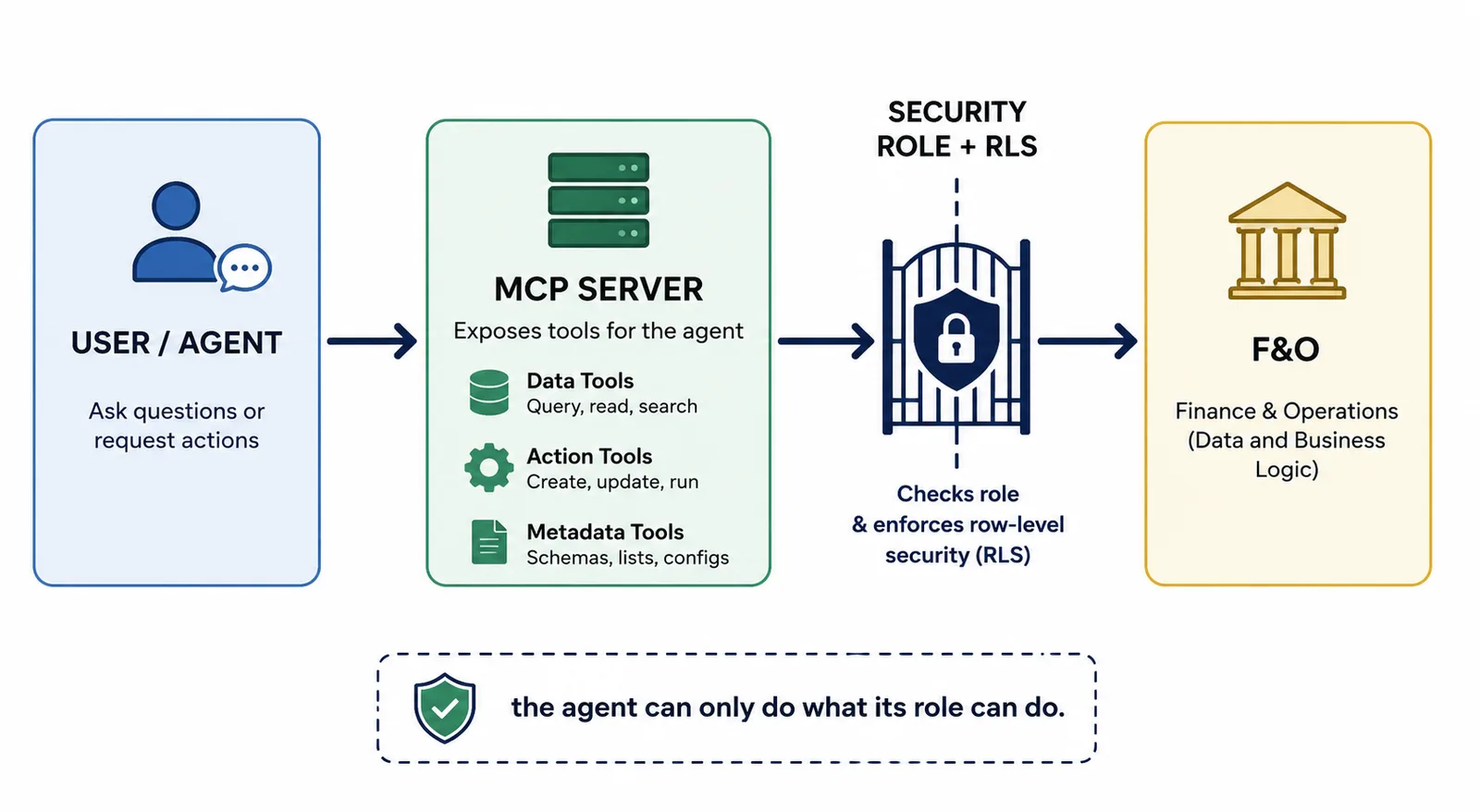
Instead of a frozen tool list, it exposes living tool categories: data tools for create/read/update/delete against entities, action tools that invoke business logic, and metadata tools the agent uses to discover your schema, including custom entities and extensions. Per Microsoft's documentation, this surfaces hundreds of thousands of ERP operations across tens of thousands of forms, without a custom connector or bespoke API. The data tools also moved off chatty form-level interactions toward direct, optimized entity operations, which is why agent responses got both faster and more reliable.
Here's the line from Microsoft Learn that matters more than any of that: when you add the MCP server to an agent, it gets access to data and business logic that matches the agent's security role and environment context. This means it gets exactly the permissions you assign it, no more, no less.
The Security Role is the Whole Ballgame
Treat the agent like a new employee on day one, because mechanically that's what it is. You wouldn't give a new hire a System Administrator and walk away. The same discipline applies, except the agent works faster and never sleeps, so a mistake propagates at machine speed.
Two failure modes sit at opposite ends:
- Over-permissioned. You point the agent at a broad role "to be safe," and now a procurement assistant can read HR records and post journals. The agent didn't do anything wrong; your role design did. Worse, row-level security and field-level security are only protecting you if they're actually configured on the underlying data; the MCP server honors them, but it can't invent boundaries you never drew.
- Under-permissioned. You lock it down so hard, the agent can't complete the task it was built for, so someone "temporarily" elevates it and forgets. Temporary elevation is how most production incidents start.
The right answer is a dedicated, least-privilege role designed for the agent's job and nothing else, validated the same way you'd validate a segregation-of-duties matrix. If the agent reconciles vendor invoices, it gets the duties that the task needs and no posting rights beyond them. The ERP Analytics MCP server, which exposes Business performance analytics to agents, makes the principle explicit: it enforces row-level security based on the user's role, so an agent only ever works with data that the user could see anyway.
What This Looks Like in Practice
The most credible production example I've seen made the rounds because the numbers are modest and therefore believable. Coca-Cola Beverages Africa runs planning cycles using Copilot Studio agents wired to Dynamics 365, and reports saving planners 1 to 1.5 hours a day. Not "10x productivity." An hour, every day, on work that used to be manual stitching across screens. That's what a well-scoped agent actually delivers.
A few patterns I keep coming back to:
- Finance variance analysis. An agent reads the record-to-report analytical model, flags the three cost centers that drifted past threshold, and drafts the commentary. It never posts anything. Read-only by design, and far less risky for it.
- Procurement assistance. The agent evaluates supplier data, drafts a requisition, and routes it for human approval. The action tool creates the record; a person still signs off. The agent compresses the busywork without owning the decision.
- Customer service triage. On the CRM side, role-based agents pull case history and draft responses, with the human deciding what actually goes to the customer.
Notice the common thread: the agent does the gathering and the drafting; the human keeps the consequential action. That's not timidity, it's good operations.
Where Teams go Wrong
- Reusing a human's broad role for the agent. It's convenient, and it's a data-exposure waiting to happen. The agent needs its own purpose-built role.
- Assuming the MCP server is the security boundary. It isn’t; it respects your boundaries. If RLS, field security, and duty separation aren't configured on the data, the agent inherits the gaps.
- No monitoring after go-live. If you can't see which agents are running, who's using them, what they cost, and where they're failing, you're flying blind. Microsoft shipped an Analytics Viewer role and agent security-posture surfacing in Copilot Studio precisely because this was the blind spot.
- Skipping the cost guardrails. Agent runs consume Copilot credits. Without pay-as-you-go caps, you can get a surprise bill from a chatty agent or a runaway loop. The usage estimator now covers Dynamics 365 agents; use it before you scale, not after.
- Letting agents take irreversible actions unattended. Posting, payments, and master-data deletes. Keep a human in the loop for anything you can't easily undo.
- No lifecycle. An agent built in a dev environment and hand-copied to production is technical debt on arrival. Treat agents like the application code they effectively are.
How to Run This
A practical sequence I use:
- Define the job before the agent. One agent, one well-bounded workflow. "Reconcile vendor invoices," not "help with finance."
- Build a dedicated least-privilege security role for that job and validate it against your SoD matrix. Confirm RLS and field security exist on the data the agent will touch.
- Decide the autonomy line. What can it do unattended (read, draft, summarize) versus what requires human approval (post, pay, delete)? Encode that in the agent's instructions and in the role.
- Apply DLP and tenant controls in Copilot Studio. Set data loss prevention policies so the agent can't bridge connectors it shouldn’t and use environment routing to keep production isolated.
- Set cost caps. Configure pay-as-you-go limits and model expected consumption with the usage estimator.
- Manage the lifecycle properly. Use solutions and the new deploy-from-Git / GitHub integration so agents move dev → test → prod with audit trails, not by hand.
- Monitor in production. Assign the Analytics Viewer role to the people who should watch performance without editing the agent, review failure patterns, and tune.
- Layer governance as you scale. Once you're past a handful of agents, Microsoft Agent 365 (GA May 2026) gives you a single plane to observe, govern, and secure them across Microsoft 365 and Copilot Studio, respecting Entra ID permissions, Purview sensitivity labels, and Conditional Access.
Where This is Heading
Two things are clear. First, agents are becoming systems, not features, multi-agent orchestration, cross-vendor coordination over MCP, and a governance plane sitting above all of it. The plumbing is consolidating fast.
Second, and more interesting for anyone who runs Dynamics for a living: day-2 agent operations is becoming its own discipline, and the industry is adjusting to match. You can see it in how managed-service providers talk about themselves now. They are using words like “experience” and “outcomes” instead of “uptime”. Synoptek's "managed experience provider" label is one example. Owning the behavior of an autonomous agent in production is an outcome-based responsibility, and it's exactly the kind of responsibility a traditional break-fix SLA was never built to capture. Whoever owns your agents has to own what they do, not just whether the service is up.
That's the real change. We're moving from "is the system available" to "is the agent behaving," and that's a harder, more continuous question.
The Takeaway
A Copilot agent in Dynamics 365 is only as safe as the security role you give it and the operations you wrap around it. The dynamic ERP MCP server makes autonomous action genuinely practical, and it deliberately hands the agent your existing permissions and nothing more. That puts the responsibility back where it belongs: on disciplined role design, real data boundaries, human-in-the-loop on irreversible actions, cost guardrails, lifecycle management, and monitoring you actually look at.
Build the agent in an afternoon if you like. Just don't ship it until you've done the unglamorous 80%.
If you've already put an agent into production against F&O, I'd genuinely like to hear how you scoped its role and where it surprised you. Drop it in the comments.
The demo always goes the same way. Someone types "create a purchase requisition for 200 units of the steel bracket from our usual vendor and route it for approval" into a chat pane, and the AI agent finds the item, picks the vendor, fills the form, and submits the workflow. But three weeks later, that agent is in production, and the questions start: Why can this thing see payroll? Who approved it, touching the ledger? It just edited a record nobody asked it to; was that allowed?
I've now deployed enough Copilot agents for Dynamics 365 Finance & Operations to say the quiet part out loud. Building the agent is only 20% of the journey. The remaining 80%, which entails deploying, governing, monitoring, and running it safely at scale, is where the real complexity begins. This article is about the 80%.
The Demo Problem
Demos optimize for the happy path. A scripted prompt, clean data, one user, no edge cases, and a presenter who knows exactly what the agent will do because they rehearsed it. Production is the opposite of all of that. You get prompts nobody anticipated, users with wildly different permissions, dirty data, and an agent that's now allowed to act, not just answer.
The business challenge isn't "can the agent do the task?" It demonstrably can. The challenge is ownership: who is accountable for what the agent is permitted to see and do, who watches it, who gets paged when it misbehaves, and who can prove to an auditor that it stayed inside its lane. That's an operations discipline, and it's one most teams haven't built yet because the technology only made autonomous action practical very recently.
What Actually Changed
If you wired an agent to F&O over the last year, you probably used the static Dynamics 365 ERP MCP server, a fixed set of 13 tools built on the Dataverse connector framework. It worked, but it was rigid, and Microsoft is retiring it during the 2026 calendar year. The replacement, the “dynamic” Dynamics 365 ERP MCP server, went generally available in February 2026.
Instead of a frozen tool list, it exposes living tool categories: data tools for create/read/update/delete against entities, action tools that invoke business logic, and metadata tools the agent uses to discover your schema, including custom entities and extensions. Per Microsoft's documentation, this surfaces hundreds of thousands of ERP operations across tens of thousands of forms, without a custom connector or bespoke API. The data tools also moved off chatty form-level interactions toward direct, optimized entity operations, which is why agent responses got both faster and more reliable.
Here's the line from Microsoft Learn that matters more than any of that: when you add the MCP server to an agent, it gets access to data and business logic that matches the agent's security role and environment context. This means it gets exactly the permissions you assign it, no more, no less.
The Security Role is the Whole Ballgame
Treat the agent like a new employee on day one, because mechanically that's what it is. You wouldn't give a new hire a System Administrator and walk away. The same discipline applies, except the agent works faster and never sleeps, so a mistake propagates at machine speed.
Two failure modes sit at opposite ends:
- Over-permissioned. You point the agent at a broad role "to be safe," and now a procurement assistant can read HR records and post journals. The agent didn't do anything wrong; your role design did. Worse, row-level security and field-level security are only protecting you if they're actually configured on the underlying data; the MCP server honors them, but it can't invent boundaries you never drew.
- Under-permissioned. You lock it down so hard, the agent can't complete the task it was built for, so someone "temporarily" elevates it and forgets. Temporary elevation is how most production incidents start.
The right answer is a dedicated, least-privilege role designed for the agent's job and nothing else, validated the same way you'd validate a segregation-of-duties matrix. If the agent reconciles vendor invoices, it gets the duties that the task needs and no posting rights beyond them. The ERP Analytics MCP server, which exposes Business performance analytics to agents, makes the principle explicit: it enforces row-level security based on the user's role, so an agent only ever works with data that the user could see anyway.
What This Looks Like in Practice
The most credible production example I've seen made the rounds because the numbers are modest and therefore believable. Coca-Cola Beverages Africa runs planning cycles using Copilot Studio agents wired to Dynamics 365, and reports saving planners 1 to 1.5 hours a day. Not "10x productivity." An hour, every day, on work that used to be manual stitching across screens. That's what a well-scoped agent actually delivers.
A few patterns I keep coming back to:
- Finance variance analysis. An agent reads the record-to-report analytical model, flags the three cost centers that drifted past threshold, and drafts the commentary. It never posts anything. Read-only by design, and far less risky for it.
- Procurement assistance. The agent evaluates supplier data, drafts a requisition, and routes it for human approval. The action tool creates the record; a person still signs off. The agent compresses the busywork without owning the decision.
- Customer service triage. On the CRM side, role-based agents pull case history and draft responses, with the human deciding what actually goes to the customer.
Notice the common thread: the agent does the gathering and the drafting; the human keeps the consequential action. That's not timidity, it's good operations.
Where Teams go Wrong
- Reusing a human's broad role for the agent. It's convenient, and it's a data-exposure waiting to happen. The agent needs its own purpose-built role.
- Assuming the MCP server is the security boundary. It isn’t; it respects your boundaries. If RLS, field security, and duty separation aren't configured on the data, the agent inherits the gaps.
- No monitoring after go-live. If you can't see which agents are running, who's using them, what they cost, and where they're failing, you're flying blind. Microsoft shipped an Analytics Viewer role and agent security-posture surfacing in Copilot Studio precisely because this was the blind spot.
- Skipping the cost guardrails. Agent runs consume Copilot credits. Without pay-as-you-go caps, you can get a surprise bill from a chatty agent or a runaway loop. The usage estimator now covers Dynamics 365 agents; use it before you scale, not after.
- Letting agents take irreversible actions unattended. Posting, payments, and master-data deletes. Keep a human in the loop for anything you can't easily undo.
- No lifecycle. An agent built in a dev environment and hand-copied to production is technical debt on arrival. Treat agents like the application code they effectively are.
How to Run This
A practical sequence I use:
- Define the job before the agent. One agent, one well-bounded workflow. "Reconcile vendor invoices," not "help with finance."
- Build a dedicated least-privilege security role for that job and validate it against your SoD matrix. Confirm RLS and field security exist on the data the agent will touch.
- Decide the autonomy line. What can it do unattended (read, draft, summarize) versus what requires human approval (post, pay, delete)? Encode that in the agent's instructions and in the role.
- Apply DLP and tenant controls in Copilot Studio. Set data loss prevention policies so the agent can't bridge connectors it shouldn’t and use environment routing to keep production isolated.
- Set cost caps. Configure pay-as-you-go limits and model expected consumption with the usage estimator.
- Manage the lifecycle properly. Use solutions and the new deploy-from-Git / GitHub integration so agents move dev → test → prod with audit trails, not by hand.
- Monitor in production. Assign the Analytics Viewer role to the people who should watch performance without editing the agent, review failure patterns, and tune.
- Layer governance as you scale. Once you're past a handful of agents, Microsoft Agent 365 (GA May 2026) gives you a single plane to observe, govern, and secure them across Microsoft 365 and Copilot Studio, respecting Entra ID permissions, Purview sensitivity labels, and Conditional Access.
Where This is Heading
Two things are clear. First, agents are becoming systems, not features, multi-agent orchestration, cross-vendor coordination over MCP, and a governance plane sitting above all of it. The plumbing is consolidating fast.
Second, and more interesting for anyone who runs Dynamics for a living: day-2 agent operations is becoming its own discipline, and the industry is adjusting to match. You can see it in how managed-service providers talk about themselves now. They are using words like “experience” and “outcomes” instead of “uptime”. Synoptek's "managed experience provider" label is one example. Owning the behavior of an autonomous agent in production is an outcome-based responsibility, and it's exactly the kind of responsibility a traditional break-fix SLA was never built to capture. Whoever owns your agents has to own what they do, not just whether the service is up.
That's the real change. We're moving from "is the system available" to "is the agent behaving," and that's a harder, more continuous question.
The Takeaway
A Copilot agent in Dynamics 365 is only as safe as the security role you give it and the operations you wrap around it. The dynamic ERP MCP server makes autonomous action genuinely practical, and it deliberately hands the agent your existing permissions and nothing more. That puts the responsibility back where it belongs: on disciplined role design, real data boundaries, human-in-the-loop on irreversible actions, cost guardrails, lifecycle management, and monitoring you actually look at.
Build the agent in an afternoon if you like. Just don't ship it until you've done the unglamorous 80%.
If you've already put an agent into production against F&O, I'd genuinely like to hear how you scoped its role and where it surprised you. Drop it in the comments.
No comments yet. Be the first to comment!